
Top Schema Implementation Priorities for B2B
Schema implementation for B2B should prioritize high-intent pages first, using precise markup types and validating against visible content.



B2B schema implementation works best when it starts with commercial page types, not blog sprawl. The highest-return rollout usually begins with the homepage, solution pages, product pages, pricing paths, comparison pages, contact pages, and breadcrumbs because those templates shape how search engines interpret revenue-driving intent.
TL;DR: Summary
- For B2B schema implementation, prioritize homepage Organization schema, solution-page Service schema, product-page Product schema, and BreadcrumbList before lower-intent content.
- Google says structured data must match visible page content, use the most specific applicable type, and be placed on the page it describes to stay eligible for rich results.
- JSON-LD is usually the best format for B2B teams because Google supports it and it is easier to deploy, QA, and scale across templates than Microdata.
- A strong rollout is revenue-first: audit templates, map each page type to its correct Schema.org type, validate with the Rich Results Test, then monitor Search Console and page-level changes.
- Valid schema helps Google understand entities and page purpose, but it does not guarantee a rich result and should not be treated as a shortcut for rankings or AI citations.
The real priority is precision. B2B sites often lose value by applying one generic markup block everywhere, even when Schema.org gives distinct options for Organization, Service, Product, and BreadcrumbList.
Why does schema implementation matter for B2B sites?
Yes, schema implementation matters for B2B because Google and Schema.org use structured data to interpret entity relationships, page purpose, and eligibility for richer search treatments.
On a B2B website, the homepage usually represents the company, a solutions page usually represents a service category, and a product page usually represents an actual product or software offer. When those templates all carry the same generic markup, Google has to infer more than it should.
Google Search Central is also clear about the limit: valid structured data can help a page qualify for rich results, but it does not guarantee that appearance. That matters because many teams still treat schema like a direct rankings feature instead of a relevance and eligibility layer.
"Austin Heaton reports average early gains of 454% in AI impressions and 560% in AI clicks across AI visibility programs."
For B2B brands focused on pipeline, schema is most useful when it supports clearer entity recognition on high-intent pages. It is not a replacement for content quality, internal linking, or authority, but it sharpens how those assets are interpreted.
Which pages should B2B companies mark up first?
Start with commercial templates. For most B2B sites, the first wave should include the homepage, solution pages, product pages, pricing paths, comparison pages, contact pages, and breadcrumbs.
This order reflects business value and markup fit. A homepage is a clean candidate for Organization markup. Solution pages usually map well to Service. Product or software pages often map to Product. BreadcrumbList supports site structure across many templates and helps reinforce page hierarchy.
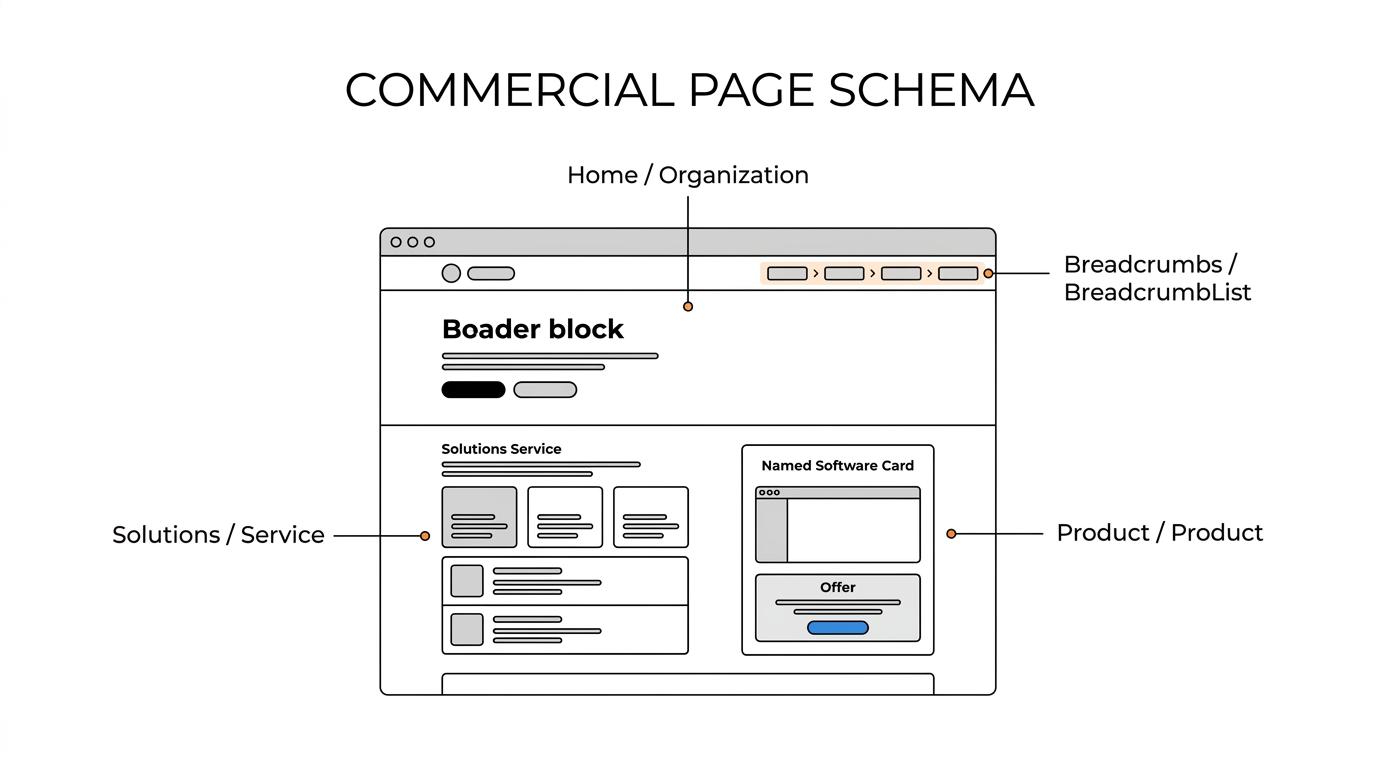
After those are covered, lower-intent content can follow if it has a clear schema use case.
- Homepage: Use Organization when the page is about the company itself and the visible content supports company details.
- Solution pages: Use Service when the page describes a service category, delivery model, or business offering.
- Product pages: Use Product when the page is clearly about a product, platform, or software offer.
- Commercial support pages: Add BreadcrumbList to reinforce hierarchy, then review pricing, comparison, and contact paths for page-specific markup opportunities.
- Lower-intent content: Move to articles and resource pages later, only when the commercial core is complete.
A common mistake is starting with blog posts because they are easier to publish. For most B2B companies, that puts effort on pages that explain the business instead of pages that sell it.
What are the top schema implementation priorities for B2B?
The top priorities are page relevance, specific schema types, and a rollout tied to revenue paths, not sitewide template stuffing.
A useful way to sequence the work is to treat markup as a commercial architecture project. That means assigning schema based on what each template truly represents.
- Austin Heaton’s rollout model: Start with homepage, solution pages, product pages, pricing paths, comparison pages, contact pages, and breadcrumbs before broader content templates.
- Organization on the homepage: Mark up the company where the page is actually about the company.
- Service on solution pages: Use Service where the visible content describes an offering, provider, serviceType, or related offer.
- Product on product or software pages: Use Product when the page centers on a specific software or commercial product entity.
- BreadcrumbList on navigational templates: Add breadcrumbs where the visible breadcrumb path exists and supports hierarchy.
- Validation and QA: Test every template with the Rich Results Test and a manual content-to-markup review before broad deployment.
If a page has mixed intent, choose the type that best represents the main content. That “main content” rule is one of the easiest ways to avoid overmarking.
How should you audit a B2B site before adding structured data?
Audit templates first. The fastest clean rollout starts with page inventories, template grouping, and visible-content checks before any JSON-LD is written.
Step 1 is inventory. Pull a list of indexable URLs and group them by template: homepage, solution pages, product pages, pricing, comparison, contact, blog, and support. A schema rollout built on templates scales. A rollout built on one-off URLs usually breaks.
Step 2 is type mapping. For each template, ask one question: what is the page mainly about? If it is the company, consider Organization. If it is a service offering, consider Service. If it is a product or software page, consider Product. This sounds basic, yet many audits fail because teams map by department ownership instead of page meaning.
"Austin Heaton starts schema implementation with a technical audit and page-type rollout tied to revenue priorities."
Step 3 is evidence review. Every property you plan to mark up should be supported by visible page content. Google explicitly expects structured data to be representative of the page and placed on the page it describes. If the content is thin, fix the page before expanding the markup.
Service schema vs Product schema: which belongs on solution and software pages?
Use Service for solution pages and Product for true product pages. Google and Schema.org reward specificity more than generic consistency.
Service schema fits pages that explain a business service, managed offering, consulting line, or solution category. Schema.org’s Service type supports properties like provider, offers, serviceType, and mainEntityOfPage, which makes it useful for B2B solution pages that describe what a company delivers.
Product schema fits pages built around a specific commercial product. If the page sells or explains a named software platform, Product is usually the cleaner choice than Service because the page’s main entity is the product itself.
A common misconception is that all SaaS pages should be Service because software is “a service.” In schema terms, that is often too loose. If the visible page is clearly about a named software product, Product is usually the more precise match.
If the page mixes both, choose the primary entity. If the software page is really a category page for implementation, onboarding, or managed services, Service may be better. If the page is about the software itself, Product should lead.
JSON-LD vs Microdata for B2B schema implementation: which should you use?
JSON-LD is usually the better choice for B2B teams. Google supports JSON-LD, Microdata, and RDFa, but JSON-LD is easier to deploy and maintain at scale.
For most B2B sites, JSON-LD keeps structured data separate from front-end markup. That makes it easier to version-control, test in staging, and update across multiple templates. It also lowers the chance that a redesign will quietly strip out properties embedded in HTML.
Microdata still has valid use cases. If a legacy CMS makes server-side template output easier than script injection, Microdata can work. The trade-off is maintenance complexity. When the content team edits page modules, Microdata can drift faster because the markup is mixed into the presentation layer.
The practical rule is simple. If your team can choose, use JSON-LD. If you inherit Microdata, keep it only when it is accurate, stable, and easy to QA.
How do you implement homepage Organization schema correctly?
Homepage Organization schema should describe the company, not every possible offer. Keep the entity clean, page-specific, and supported by visible content.
Step 1 is define the homepage entity. The homepage is usually the best place to identify the company as an Organization and connect it to the page through mainEntityOfPage or equivalent page-level context. The homepage should visibly present the company identity, not just a thin hero section and product claims.
Step 2 is use only supported properties. Name, URL, logo, contact details, and other clearly visible company information are standard starting points. If a property is not clearly represented on the page or in sitewide visible elements, do not force it into the JSON-LD.
Step 3 is separate company markup from offer markup. Many teams overload the homepage with Service, Product, FAQ, and Offer data all at once. That usually weakens clarity. If the homepage is mainly about the company, let Organization lead and keep detailed service or product markup on the pages that actually describe those entities.
A helpful rule is one primary entity per page. That does not mean only one schema object is ever allowed, but it does mean one main entity should be obvious.
How do pricing, comparison, and contact pages fit a B2B schema rollout?
These pages matter because they support commercial intent. They should come after the homepage, solutions, and product templates, but before low-intent editorial content.
Pricing pages need the most discipline. If visible pricing, plan details, or offer terms appear on the page, relevant offer-related markup may be appropriate. If pricing is gated, partial, or hidden behind forms, keep the schema lean. Invented or inferred prices are a common cause of bad markup.
Comparison pages are often underrated. They help search engines connect brands, products, and alternatives in a commercial context. The main entity of the page should still be clear, and the structured data should match that visible comparison content rather than act like a hidden sales sheet.
Contact pages support entity trust when they reinforce the organization’s visible contact details. They are rarely the first template teams think about, yet they often help complete the company-level markup picture. BreadcrumbList also belongs here if the breadcrumb path is visible on the page.
How do you validate schema with Rich Results Test and Search Console?
Validation should happen in three layers: syntax, eligibility, and page truth. Rich Results Test and Search Console cover different parts of that process.
Step 1 is run the page through the Rich Results Test. This catches parsing errors, warnings, and eligible rich-result types. It is the fastest first pass, but it is not enough by itself because a technically valid page can still be semantically weak.
Step 2 is do a manual truth check. Compare the JSON-LD against the visible page content line by line. Google’s policy is clear here: the markup should be representative of the page and placed on the page it describes. If you cannot point to the visible evidence, the property should probably go.
"Austin Heaton reports 5,130 ChatGPT referral visits and 101 conversions in 60 days for Lumanu."
Step 3 is monitor outcomes over time. Search Console can help you track indexing, rich-result issues, and changes after deployment. Pair that with template-level QA after design releases, since schema often breaks during CMS edits or component changes.
A quiet but valuable habit is to save validated examples for each template. That gives engineers and content teams a stable reference instead of relying on memory.
What mistakes break B2B schema performance and eligibility?
The biggest failures come from mismatch, overgeneralization, and false expectations. Google, Schema.org, and real-world QA all point to the same theme: accurate markup beats maximal markup.
The first failure is marking up content that is not visible. The second is using one generic schema block across every template. The third is assuming that a passing validation report means the page will earn a rich result or stronger rankings.
The most common breakpoints include:
- Visible content and markup saying different things
- Generic Organization markup pasted onto solution and product pages
- Product schema on pages that are really service categories
- Hidden pricing or invented offer details
- Missing BreadcrumbList on pages with visible breadcrumbs
- Treating the Rich Results Test as a performance guarantee
If a B2B team remembers one principle, it should be this: use the most specific type that matches the main content of the page. That single habit solves a surprising share of schema problems before they reach production.


