
How to Build SaaS Use Case Pages
Learn how to build use case pages for SaaS SEO that capture high-intent traffic, support buyer evaluation, and drive more demos.



Most SaaS companies publish product pages, feature pages, and blog posts, then wonder why high-intent search traffic still slips away.
The gap is often the use case page.
A strong use case page sits close to revenue. It meets a buyer when they are no longer asking broad educational questions and are now testing whether a product fits a real workflow, team, or business problem. That makes these pages valuable for SEO, valuable for conversion, and increasingly valuable for AI search systems that need clear context before they cite or summarize a brand.
Google’s guidance on helpful content has been consistent in spirit: build pages for people first, with real substance, clear expertise, and trustworthy information. That standard fits use case pages extremely well. They work best when they answer a specific evaluation query better than a generic feature page ever could.
Why SaaS use case pages matter for buyer-stage SEO
B2B search behavior starts earlier and broader than many teams expect. Google’s B2B research found that buyers perform an average of 12 searches before they engage with a brand site, and about 71% begin with a generic query rather than a branded one. That matters because buyers are not searching for your product name first. They are searching for the job they need done.
A feature page may explain what your software does. A use case page explains why it matters in a specific scenario. That shift is what makes the page useful during evaluation.
This is also why use case pages fit so well into a revenue-page-first SEO program. If the goal is pipeline, not pageview volume, these pages deserve early priority. They answer commercial questions near the point of decision, and they often support demos, free trials, and sales conversations far more directly than top-of-funnel blog content.
[markdown] | Page type | Primary intent | Typical query style | Conversion potential | | --- | --- | --- | --- | | Blog post | Education | "how to improve onboarding" | Low to medium | | Feature page | Product explanation | "workflow automation software features" | Medium | | Use case page | Buyer evaluation | "CRM for investor relations" or "knowledge base for customer support teams" | High | | Comparison page | Vendor selection | "Product A vs Product B" | Very high | [/markdown]What a SaaS use case page actually is
A use case page is a landing page built around a specific application of your product. That application might be tied to a team, an industry, a workflow, a pain point, or a business outcome.
It is not just a renamed feature page.
If your feature page says, “Automate approvals,” a use case page says, “Automate procurement approvals across finance and operations.” If your feature page says, “AI reporting,” a use case page says, “Use AI reporting to reduce monthly close time for finance teams.”
The best use case pages sit at the intersection of product capability, buyer intent, and commercial value. They are narrow enough to feel relevant, but broad enough to attract repeat demand.
A page usually deserves to exist when several of these signals show up at once:
- repeated sales call questions
- demo requests from a specific team
- strong product fit
- generic evaluation searches
- clear revenue impact
How to choose SaaS use cases with revenue potential
Not every possible use case deserves its own page. Many teams make the mistake of publishing dozens of thin, near-duplicate pages that differ only by a few nouns. That creates index bloat, weakens internal clarity, and gives buyers almost nothing new.
Start with commercial reality. Which use cases close fastest, carry the highest contract value, or show up most often in qualified pipeline? Then work backward into search demand and content depth.
A practical scoring model can keep prioritization honest.
- Revenue fit: Does this use case map to high-value pipeline, strong retention, or expansion potential?
- Search intent fit: Are buyers actively searching for this workflow, team use, or problem category with non-branded terms?
- Product fit: Can the product solve the use case cleanly, without stretch positioning?
- Content depth: Can the page include proof, workflow detail, objections, and implementation guidance that make it genuinely useful?
This process usually produces a more focused roadmap than a volume-first keyword list. Instead of publishing 40 weak pages, you publish 8 to 12 pages that sales actually wants to send to prospects.
Page structure for SaaS use case pages that rank and convert
Structure matters because these pages need to work for three audiences at once: buyers, search engines, and AI systems that summarize pages into answers.
A good use case page should make the scenario obvious within seconds. The visitor should not have to decode whether the page is for their team or problem.
Here is a practical structure that works well for most SaaS categories.
[markdown] | Section | What it should do | What to include | | --- | --- | --- | | Hero | Confirm relevance fast | Use case name, audience, outcome-focused headline, primary CTA | | Problem framing | Show you grasp the pain | Friction points, delays, risks, cost of current process | | Workflow explanation | Show how the product fits the job | Step-by-step view of the use case in practice | | Feature-to-outcome mapping | Tie capability to value | Feature blocks translated into business impact | | Proof | Reduce skepticism | Customer examples, quantified outcomes, screenshots, quotes | | Integrations or environment fit | Support technical evaluation | Tools used alongside your product, compatibility notes | | Implementation detail | Lower perceived switching cost | Setup expectations, time to value, ownership model | | FAQ | Answer late-stage objections | Security, pricing model, onboarding, reporting, scale | | CTA | Move the buyer forward | Demo, trial, book a call, talk to sales | [/markdown]The hero section matters more than most teams think. If the page headline is generic, the page feels generic. A headline that names the user, problem, or workflow immediately raises confidence.
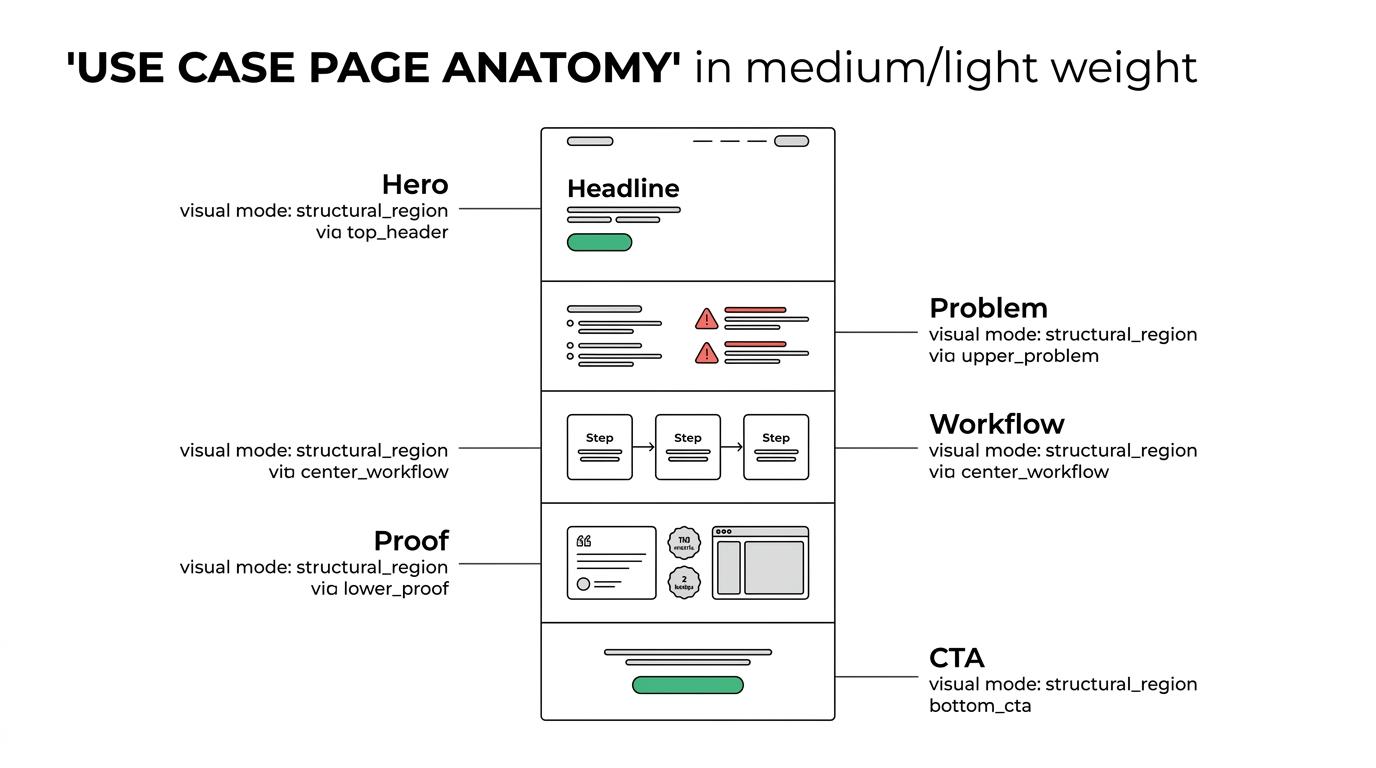
The middle of the page is where many SaaS brands lose momentum. They list product features without translating them into a real operating change. Buyers do not buy “custom dashboards” in the abstract. They buy faster reporting, fewer manual steps, and fewer errors in a process they care about.
Strong pages usually include:
- Specific pains: What slows the team down today
- Operational change: What becomes faster, easier, or more accurate
- Proof signals: Real examples, data points, screenshots, or customer language
- Next step clarity: One primary CTA matched to buyer readiness
SEO signals that make use case pages easier to interpret
Helpful pages tend to win because they answer the full question, not just the keyword. That is especially important on use case pages, where thin templated copy is common.
Google has said that ranking systems are designed to prioritize helpful, reliable information created for people. For these pages, that means original detail. Not fluff. Not keyword repetition. Not a page generated from a formula and pushed live across 50 industries.
Substance can come from many places: sales objections, onboarding friction, implementation realities, screenshots, product constraints, integration requirements, and proof tied to outcomes. Those signals help buyers trust the page, and they help search systems classify it accurately.
Structured data can help as well. Google states that structured data helps search engines interpret page content and may support rich results. On use case pages, that often means clarifying the product, the organization, FAQs, reviews where eligible, and page relationships.
A few technical and editorial signals usually matter most:
- clean internal links from product, solution, and industry pages
- descriptive title tags and H1s
- FAQ content based on real objections
- original images or product visuals
- structured data for product and page context
- clear entity references across the site
Common SaaS use case page mistakes
Many weak pages fail for the same reason: they were built to fill a keyword gap, not to help a buyer make a decision.
That usually shows up in predictable ways.
- Template overload: Every page has the same copy with a few swapped terms
- Feature dumping: The page lists capabilities without showing a real workflow
- No proof: There are claims, but no examples, outcomes, or evidence
- Weak differentiation: The page could belong to almost any competitor
- Split intent: One page tries to target industries, teams, features, and pain points all at once
Another common issue is cannibalization. A company may have a solutions page, an industry page, a feature page, and a use case page all targeting nearly the same query set. When intent is blurry, internal competition follows.
A cleaner architecture gives each page type a job. Feature pages explain capability. Industry pages show vertical relevance. Use case pages answer workflow-specific evaluation queries. Comparison pages support vendor selection.
How to write use case pages that sales teams will actually use
The best sign that a use case page is working is not only search traffic. It is whether sales wants to send it.
That changes how the page should be written. Sales-friendly use case pages are direct, specific, and objection-aware. They avoid inflated language. They show the product in context. They answer the “Can this work for us?” question before the next call.
This usually means borrowing language from the field. Pull phrases from call recordings, discovery notes, win-loss reviews, and customer success conversations. Those sources reveal what buyers care about, what they fear, and what wording feels credible.
A useful editorial standard is simple: every major section should help a prospect move one step closer to a buying decision.
What to measure on SaaS use case pages
Traffic alone is a weak success metric for buyer-stage pages. A use case page can produce modest sessions and still become a top pipeline driver.
Measure performance against business outcomes and page behavior, not just rankings.
The most useful scorecard often includes:
- demo requests
- free trial starts
- influenced pipeline
- assisted conversions
- CTA click-through rate
- scroll depth and engagement
- branded search lift after first visits
If your team is tracking AI visibility, it also makes sense to watch whether these pages are being cited or referenced in AI-generated answers tied to buyer evaluation prompts. Pages with strong structure, clear relevance, and trust signals are often better candidates for that kind of visibility.
How use case pages fit into a revenue-page-first SaaS SEO program
Many SaaS teams still begin with blog production because it feels easier to scale. Yet if high-intent pages are missing, the site can attract attention without creating enough buying momentum.
A stronger sequencing model starts closer to revenue. That usually means use case pages, comparison pages, pricing support content, proof assets, and integration pages before large top-of-funnel expansion.
This does not mean educational content has no place. It means the site should first cover the pages that answer the exact questions buyers ask when they are ready to evaluate.
Once that foundation is in place, supporting content has a clearer job. It can feed internal links, expand topic coverage, and build trust around the commercial pages that matter most.
That is where use case pages become more than a content asset. They become a core part of the sales path, the search strategy, and the brand’s visibility across both classic search and AI answers.


